PREPARE for your next class with interactive slides & readings
Published:

Josh Ferry Woodard
Marketing Manager & Prompt Engineer

Turn lecture slides and readings into something you can explore, annotate and ask questions about, before class begins.
You open the reading for your next seminar. There are unfamiliar terms, several pages of explanation and a diagram you’re hoping will make more sense when someone talks you through it.
You want to prepare. But where do you start?
You shouldn’t have to understand everything before your lecturer has even explained it. Sometimes, you just need a little help finding your way in.
Introducing PREPARE, the new workflow that brings valuable Jamworks features like summaries, key points, annotations and JamTutor to your uploaded learning materials. Everything students and educators love about Jamworks for lecture recordings is now available for lecture slides and pre-class readings.
It’s a way to start exploring what’s coming, notice what needs explaining and bring your own questions into class.
You don’t need to know everything. You need a starting point.
Preparing for class doesn’t have to mean teaching yourself the entire topic.
It might mean getting familiar with a few key terms. Recognising the main ideas. Or turning “I don’t understand this” into a specific question you can ask.
There’s research behind starting with the basics. In experiments on learning from narrated animations, students who first learned about the components being explained performed better at applying their understanding than students who hadn’t received that preparation. You can read more about the study here.
Think of those familiar ideas as anchor points: something to connect the next explanation to, rather than encountering everything for the first time. You don’t need to master your material completely before class, but having a reference point can significantly improve comprehension and make it easier to connect the dots during the lesson.
The goal is simple: arrive with something to build on.
Three steps from unfamiliar material to a useful starting point
1. Bring your materials
Start with one set of lecture slides or one assigned reading.
Open Jamworks on desktop, go to your recordings page and select Add media → Upload media. Choose your document and upload it. PREPARE supports PDF, PowerPoint (.pptx) and Word (.docx) files.
You don’t need to tackle everything at once. Pick the material for your next class and begin there.
You can learn more about how to get started on our PREPARE help page here.
2. Find your starting point
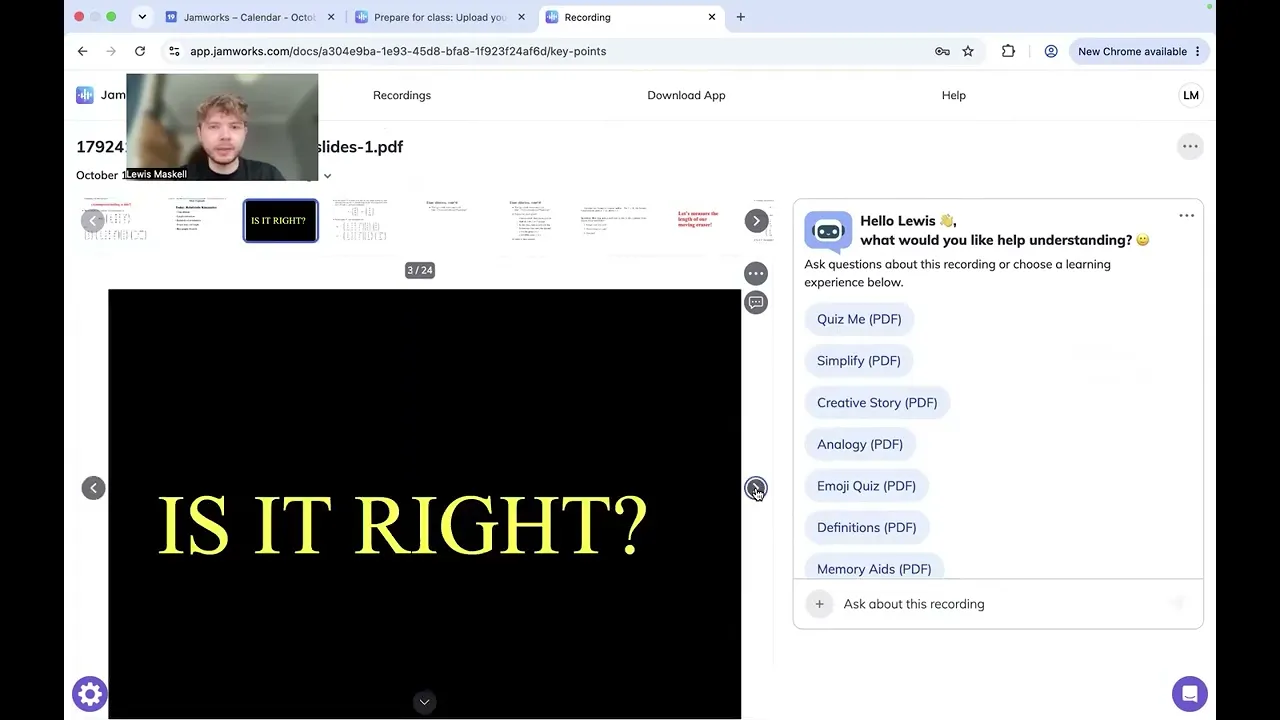
Open your document to explore its summary and structured key points.
Start with the overview, then use it to guide a closer look at the original material. As you read, ask yourself:
What is this topic mainly about?
Which ideas do I already recognise?
What would I like explained more clearly?
You’re not trying to memorise every point. You’re getting your bearings.
Treat the summary as a way into the reading, rather than a replacement for it. Choose an idea, return to the relevant page and explore how the author explains it.
3. Make it your own
Add your thinking directly to the material. Use drawing and text annotations to mark what stands out and capture what you want to revisit.
Circle an unfamiliar term. Draw a connection between two ideas. Write “Ask about this in class” beside a confusing explanation.
Your annotations don’t need to look polished. They just need to be useful to you.
You can also ask JamTutor questions about your uploaded document. Try asking:
“Can you explain this concept in simpler language?”
“How are these two ideas connected?”
“What does this term mean in this reading?”
Not sure how to begin? Use the quick prompt learning modes to start exploring without writing a question from scratch.
Choose the approach that suits the material and what you need from it.
What could preparation look like?
Imagine you’ve been given a reading ahead of a seminar.
Instead of setting yourself the goal of “understand the whole thing”, try a smaller, more specific routine:
Get an overview. Read the summary, then scan the key points.
Choose something to explore. Pick an unfamiliar idea and find it in the original reading.
Ask a question. Try asking JamTutor to explain that idea another way.
Capture your thinking. Add an annotation in your own words.
Bring one question to class. Note anything you still want to discuss.
You might finish with a clearer understanding. You might finish with a burning desire to ask your instructor about something that piques your interest. Both are useful reasons to prepare.
When that topic comes up in class, your aim isn’t to think, “I already know all this.” It’s to think, “I recognise this and here’s what I want to understand next.”
Keep building on your preparation
Your pre-class notes don’t have to stay separate from the lecture.
If you record your class with Jamworks, you can manually attach your prepared document afterwards. Open the recording, go to Slides and select Attach existing document or slides. Your document’s notes and annotations come with it. Learn more here.
Then revisit the questions you brought into class. Which ones were answered? What would you now explain differently? What do you want to explore further?
Preparation becomes something you can return to and build on.
Start with your next class
PREPARE is currently available on web and desktop.
You don’t need perfect notes or a complete understanding before you walk through the door.
Start with one document. Explore one unfamiliar idea. Bring one question.
Open Jamworks on your laptop and upload the slides or reading for your next class. Start preparing!
You don’t have to arrive knowing everything. Just arrive with somewhere to start.